ScreenCast Studio is a free screen, camera, and dual-screen recorder for Chrome & Edge. Capture your desktop, webcam, or both with 14 picture-in-picture layouts. Annotate in real time, generate AI subtitles, trim, add watermarks — all processed locally, nothing uploaded.
Powerful recording features wrapped in a clean, intuitive interface. No ads, no spyware, no hidden costs.
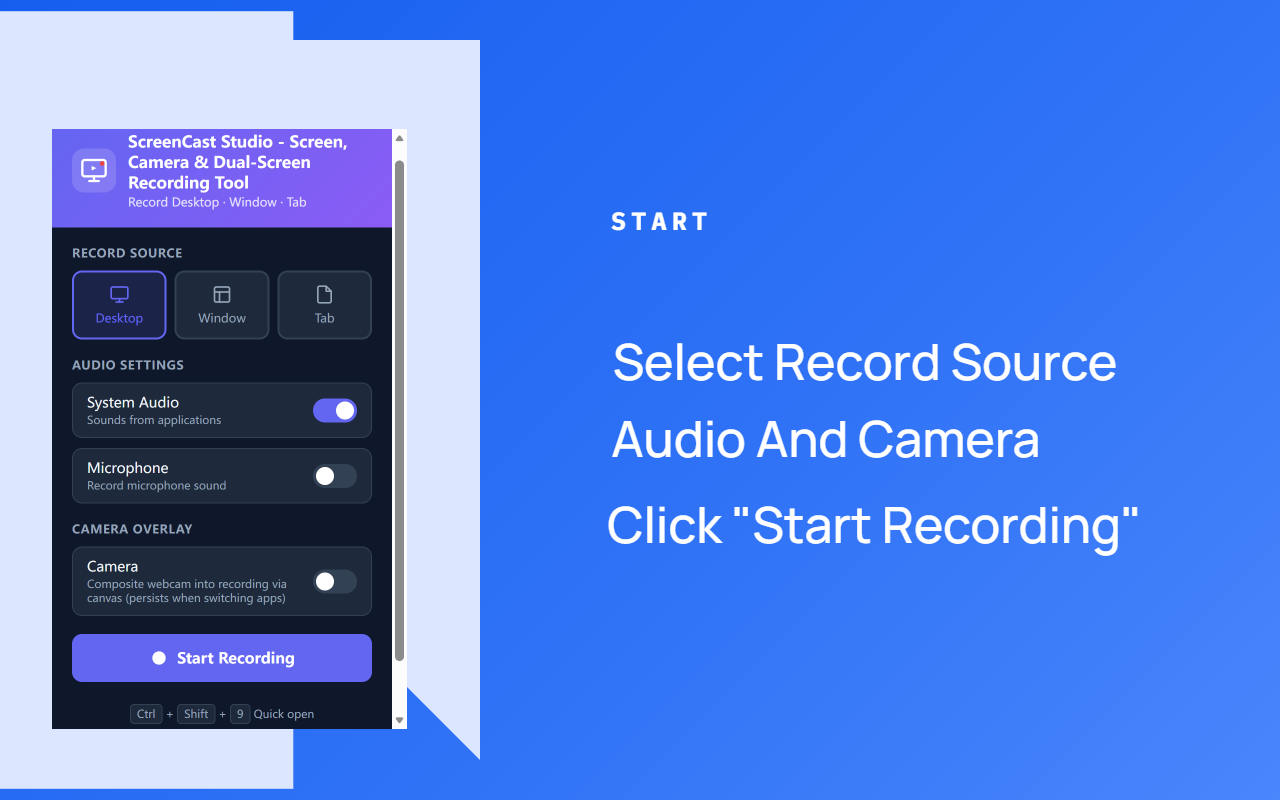
Capture your entire desktop, a specific application window, or a single browser tab. Switch sources with one click.
Record application sounds and your voice simultaneously. Perfect for tutorials, presentations, and gameplay commentary.
Record from your webcam and overlay it on your screen capture. Choose camera-only fullscreen mode or composite with screen recording.
Composite camera and screen with 14 layout options: picture-in-picture, rounded PiP, split-screen, overlay, and camera-only modes with gradient backgrounds.
Videos are generated in your browser and saved directly to your device. No cloud uploads, no waiting, no sign-up.
Built-in converter transforms WebM recordings to universally compatible MP4 format — no extra software needed.
Set a countdown timer or schedule a specific time to auto-start recording. Perfect for capturing live streams and events without being at your desk.
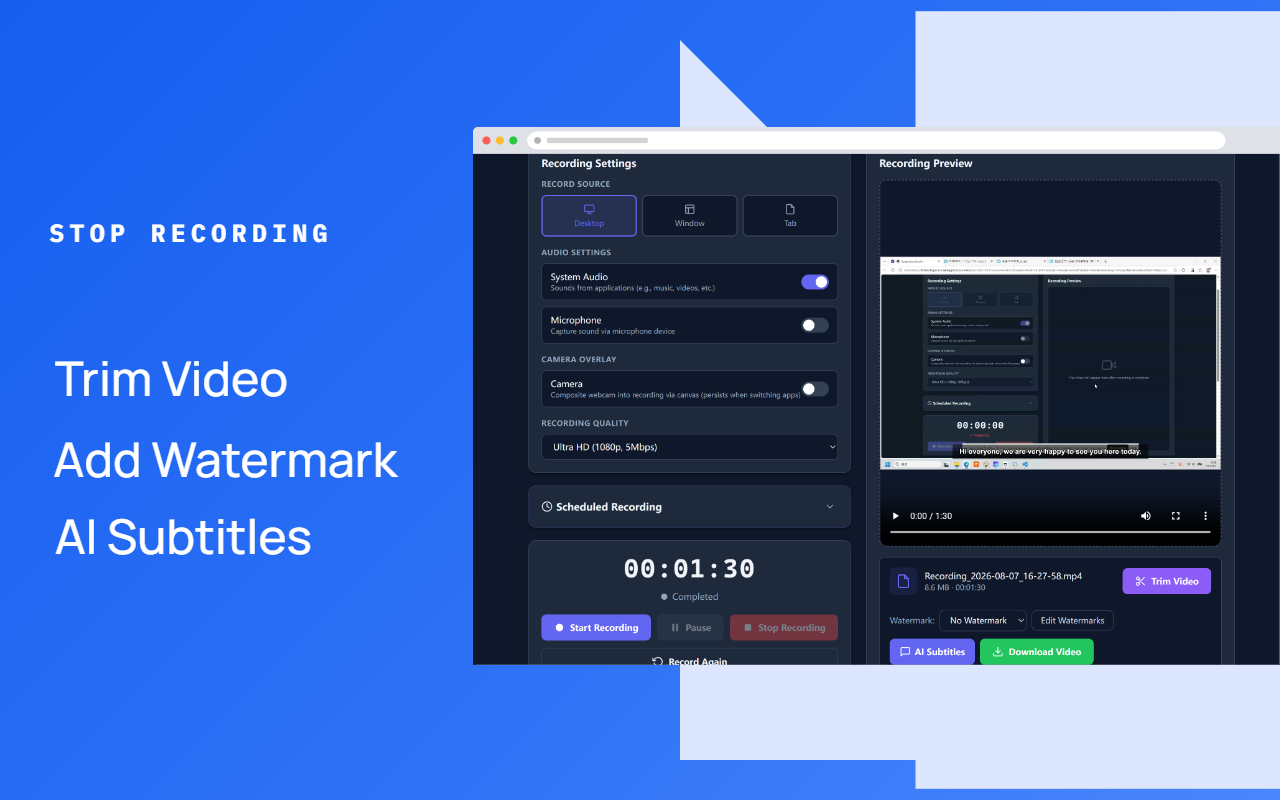
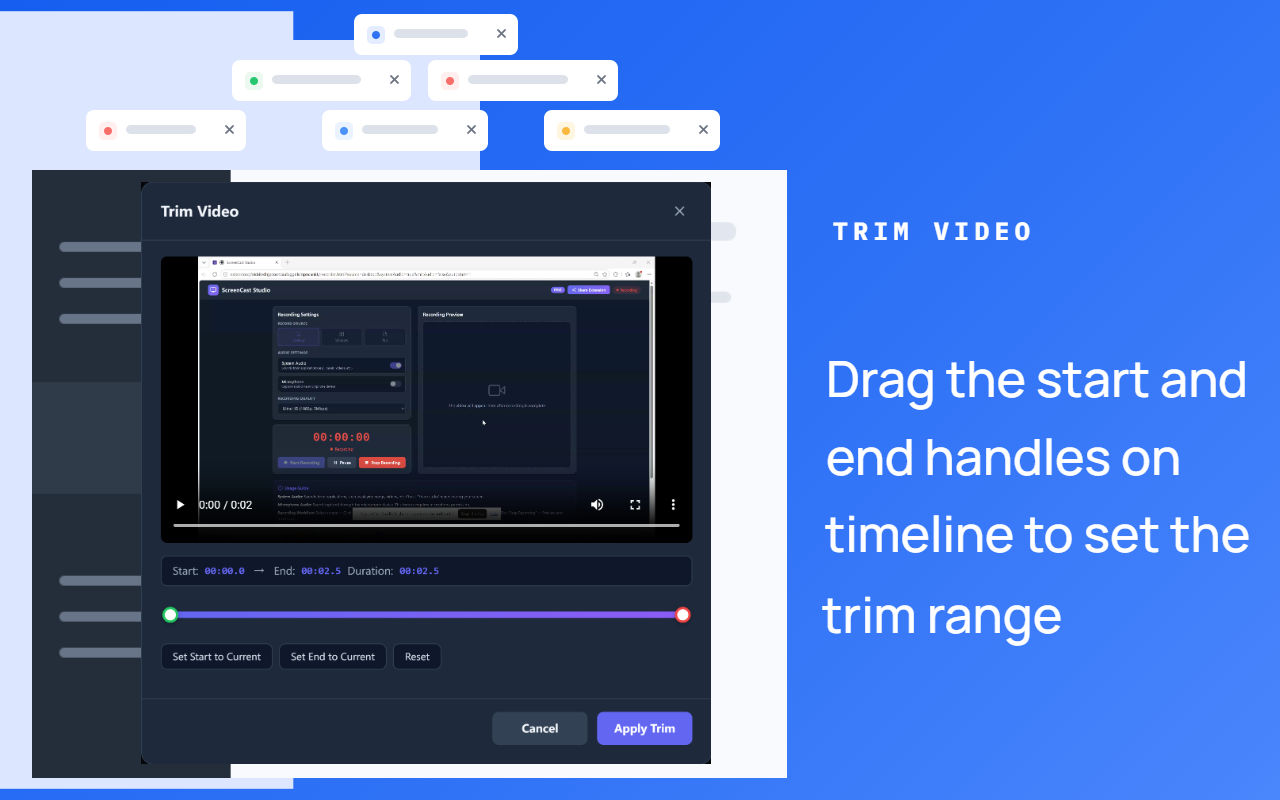
Cut unwanted segments from your recordings. Drag the timeline handles to set the trim range and export only what matters.
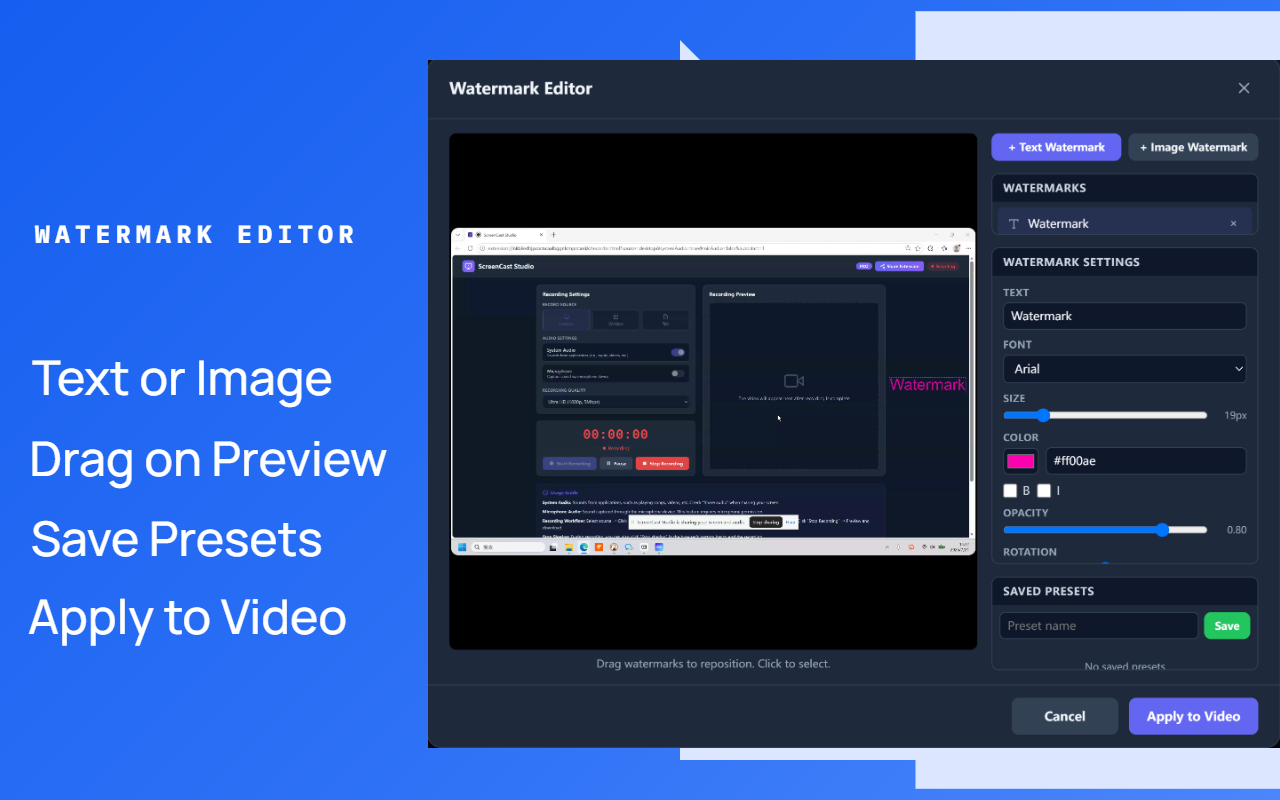
Add text or image watermarks with full control over position, size, color, opacity, and rotation. Save presets for reuse across recordings.
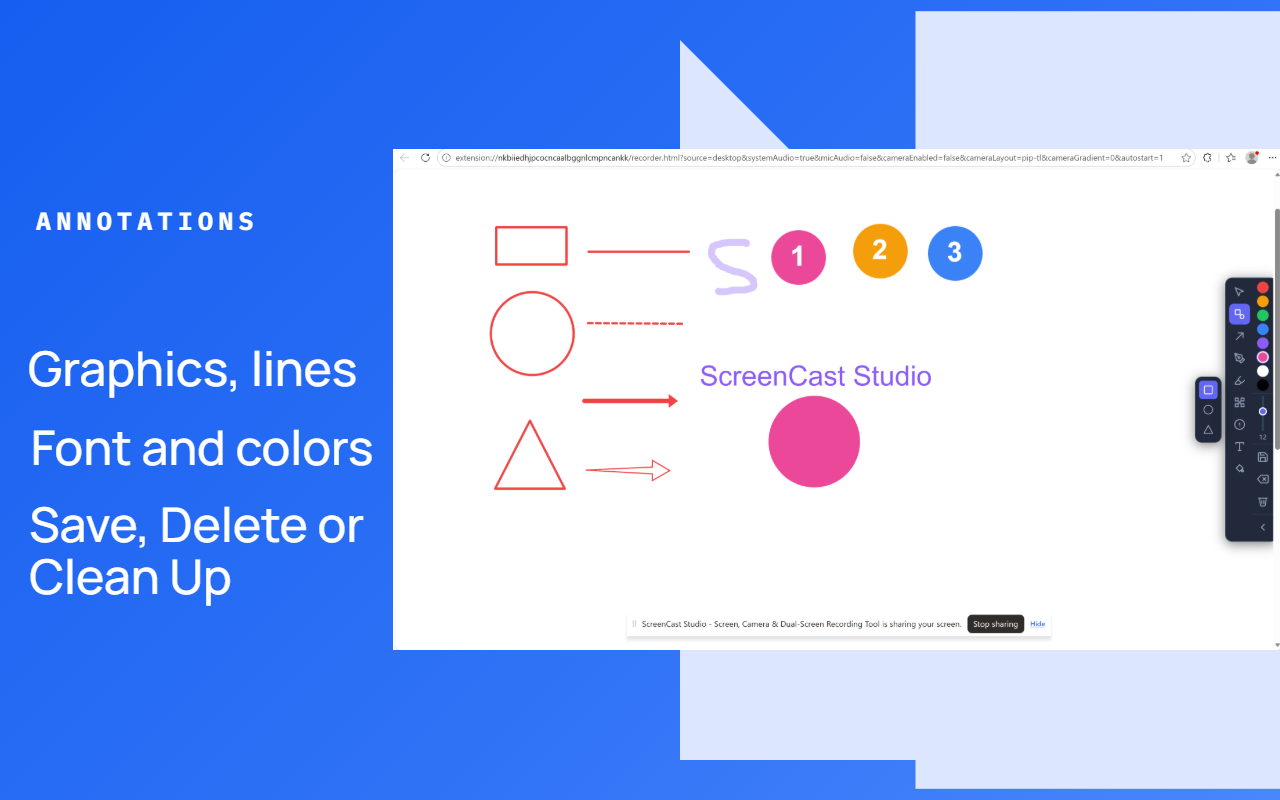
Draw shapes, arrows, lines, text, and mosaic in real time during recording. Switch to white canvas mode for detailed annotations and save as PNG.
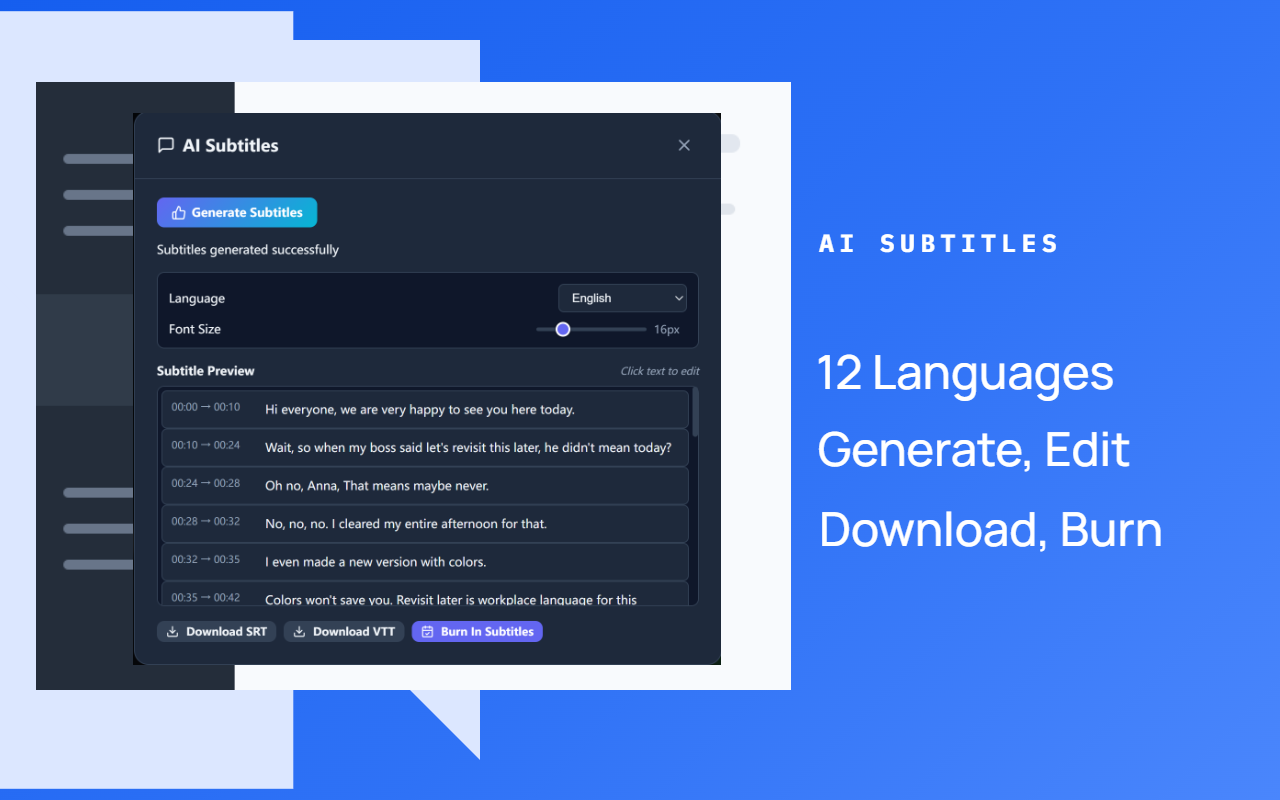
Automatically transcribe audio to subtitles in 12 languages using a local AI model (Whisper). Edit text, export SRT/VTT, or burn subtitles directly into video — no data uploaded.
All recording data stays in your browser. We never upload, transmit, or share your screen content with any server.
Full interface localization in English, Chinese, Arabic, Spanish, French, German, Hindi, Japanese, Korean, Portuguese, Russian, and Bengali.
From install to download in under a minute. No account required.
Install from Chrome Web Store or Edge Add-ons with one click.
Select desktop, window, or tab. Toggle audio and camera overlay.
Hit the record button and capture your screen in real time.
Preview, annotate, generate AI subtitles, trim unwanted segments, add watermarks, and download. Convert to MP4 if needed.
Start free with 360p/480p and 10-minute recordings. Subscribe for unlimited everything.
| Feature | Free | Pro $19.99/month |
|---|---|---|
| Screen recording (desktop/window/tab) | ✓ | ✓ |
| System audio + microphone | ✓ | ✓ |
| WebM to MP4 conversion | ✓ | ✓ |
| Scheduled recording (countdown timer or specific time) | ✓ | ✓ |
| Local download (no upload) | ✓ | ✓ |
| Camera recording & overlay | ✓ | ✓ |
| Camera layouts (picture-in-picture, split, overlay) | 4 layouts | All 14 layouts PRO |
| Video trimming | ✗ | ✓ PRO |
| Watermark editor (text + image) | ✗ | ✓ PRO |
| Annotation tools (shapes, arrows, text, mosaic) | All tools ✓ | All tools ✓ |
| AI subtitles (12 languages, SRT/VTT, burn-in) | ✗ | ✓ PRO |
| Video quality | 360p / 480p | Up to 1080p Ultra HD |
| Max recording duration | 10 minutes | Unlimited |
| License type | Free forever | Monthly, cancel anytime |
| Future updates | ✓ | ✓ |
Whether you're teaching, presenting, or creating content, ScreenCast Studio has you covered.
Record lectures and tutorials with clear system audio for students.
Capture video calls and online meetings for later review or sharing.
Walk through code demos, software features, and step-by-step guides.
Produce YouTube videos, demos, and social media content with audio narration.
Record your webcam and screen simultaneously with picture-in-picture layouts for reaction videos or vlogs.
Record screen to reproduce and document bugs for development teams.
Capture gameplay with system audio for streaming or highlights.
ScreenCast Studio processes all recordings locally in your browser. There are no servers, no cloud storage, and no tracking.
Yes! The free version includes full recording features with 360p/480p quality and up to 10-minute recordings. No watermark, no sign-up, no credit card. You only pay $19.99/month if you need 1080p quality and unlimited duration.
No. All screen and audio data is processed entirely in your browser. Recordings are only saved when you click the download button, and they go directly to your local device. We have no servers that receive your recording data.
ScreenCast Studio works on Google Chrome, Microsoft Edge, and other Chromium-based browsers. Firefox support is also available via Mozilla Add-ons (AMO). The extension requires Manifest V3 compatible browser.
Yes. Enable both "System Audio" and "Microphone" in the recording settings. The extension automatically mixes both audio sources into a single track. Note: for system audio, you must also check "Share audio" in the browser's screen sharing dialog.
Yes! Enable the camera option in the recording settings to capture your webcam. You can record camera-only (fullscreen or centered), or overlay it on your screen recording. The camera feed is composited via canvas in real time, so it persists even when you switch applications during recording.
Dual-screen layouts composite your camera and screen into a single video. ScreenCast Studio offers 14 layouts including picture-in-picture (4 corners, rounded corners), split-screen (left/right), overlay (camera on top of screen), and camera-only modes. The free version includes 4 layouts; Pro unlocks all 14. You can also choose from 180 gradient backgrounds for the camera area.
Recordings are saved in WebM format by default. The extension includes a built-in WebM-to-MP4 converter that re-encodes the video using Canvas + MediaRecorder, so you can get MP4 files without installing any additional software.
Yes! Video trimming is a Pro feature. After recording, click "Trim Video" to open the trim editor. Drag the start and end handles on the timeline to select the segment you want to keep, then click "Apply Trim" to generate the trimmed video. The original recording is preserved.
Yes! The Watermark Editor is a Pro feature. Click "Edit Watermarks" to open the visual editor, where you can add text or image watermarks, drag them to position on a live preview, and adjust font, size, color, opacity, and rotation. Save watermark presets for reuse, and apply them automatically when downloading. Watermarks are burned into the video using Canvas-based rendering for pixel-perfect accuracy.
Yes! Annotation Tools are available during recording for all users. Use the annotation toolbar to draw shapes (rectangle, circle, triangle), lines (solid, dashed, solid arrow, hollow arrow), pen, highlighter, mosaic, number markers, and text directly on your screen. Choose colors and brush sizes, then draw in real time. Click "Expand" to switch to a white canvas mode for detailed annotations, and save the annotated screenshot as a PNG image.
Yes! AI Subtitles is a Pro feature that uses a local Whisper AI model to transcribe your recording's audio into subtitles. It supports 12 languages with automatic language detection, and Chinese output is automatically converted to Simplified Chinese. The AI model runs entirely in your browser — no audio data is ever uploaded. The first use downloads the model (~80MB, cached for offline use afterward). After transcription, you can edit subtitle text by clicking it, then export as SRT or VTT, or burn the subtitles directly into the video.
It's a monthly subscription with automatic renewal via PayPal. You get unlimited recording quality, unlimited duration, and all future updates. Cancel anytime, no long-term commitment.
The interface is fully localized in 12 languages: English, Chinese (Simplified), Arabic, Spanish, French, German, Hindi, Japanese, Korean, Portuguese (Brazilian), Russian, and Bengali. The extension auto-detects your browser language.
Free forever. No watermark. No sign-up. Just click and record.